
Похожее видео
×
How to Test Audio in Skype
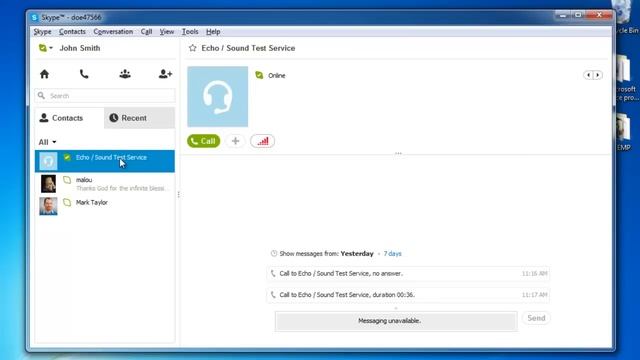
Видео: How to Test Audio in Skype
This tutorial will show you how to test the audio on Skype. Dont forget to check out our site for more free how-to videos! - our feed - join us on facebook - our group in Google In this tutorial you are going to learn how to test Skype audio. Step 1 -- View your contacts select the audio test contact Open the Skype application and make sure you are logged in to your Skype account. From the default home page view select the Contacts tab found just below the search bar underneath the home icon. Select the contact named EchoSound Test Service. Details of this contact will appear in the right pane of the window and you can see that they are online this is always the case so users can always make test calls. Step 2 -- Test the audio settings Click on the green Call button that appears below the picture of the selected Echo Sound Test Service contact. This will activate a call to the testing service allowing you to test your speakers by listening to the Skype audio test service and to record your own voice to test your microphone. Follow the instructions of the testing service. This completes the instructions for how to test Skype audio.,



2023-09-27 в 06:54:02

2026-05-20 в 07:23:24


2026-05-20 в 07:59:44



2023-09-27 в 06:13:49





2023-09-27 в 06:50:18

2026-05-20 в 11:53:55