Похожее видео
×
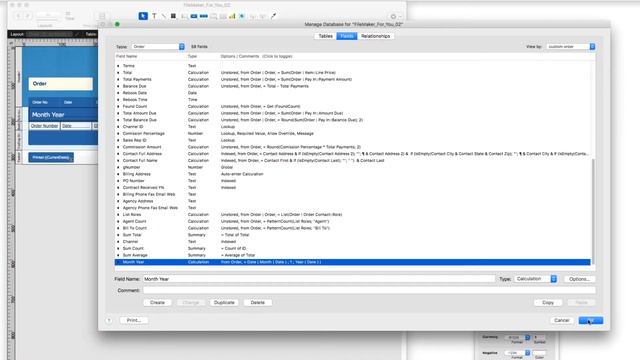
FileMaker group report by month year with a single field! Beginner Tutorial FileMaker For You
Видео: FileMaker group report by month year with a single field! Beginner Tutorial FileMaker For You
Grouping sales by month and year is a common FileMaker reporting request. What do you do when there is no single field that will do the trick? If you use a FileMaker sub-summary part and sort by the order date then all orders for that day will be grouped together. Not what you want. If you sort by month and then by year you need two sub-summary parts and it is still not what you want. In this FileMaker tutorial I show you how to set up your your report with a single sub-summary part and sort field to group your orders by month and year. Are you too busy to do the work yourself? Contact me FileMaker Cheat Sheet - 9 pro tips for finding powerful insights and quick analysis fast Infographic Get More Great Tips - Subscribe Newsletter registration early announcements for free live webinar workshops -- limited seats MORE VIDEOS: Easy Excel summary reports with Filemakers export group option Fast sales call lists in FileMaker - Get the phones ringing! How to save finds in FileMaker - automate your find routine!: Sort by a FileMaker Summary Field What categories perform well and which dont? Custom sort your records override the alpha sort!: FileMakers View menu - 14 tools to make work easier! Too busy to get the work done yourself? Contact me Newsletter registration early announcements for free live webinar workshops -- limited seats: filemaker filemakerforyou fm4u,

2023-12-06 в 03:36:52

2026-04-20 в 20:36:10







2026-04-21 в 05:31:15

![Работаем с рисунком Smart Art в программе PowerPoint[Ludmila Danilo]](https://pic.rtbcdn.ru/video/67/fa/67faebcc91486dc0e2c48fff1377ac32.jpg)
2023-12-06 в 03:39:04


2023-12-06 в 03:35:29
2023-12-06 в 03:59:54