
Похожее видео
×
How to Auto Shutdown Windows 11 | Shutdown Timer Windows 11
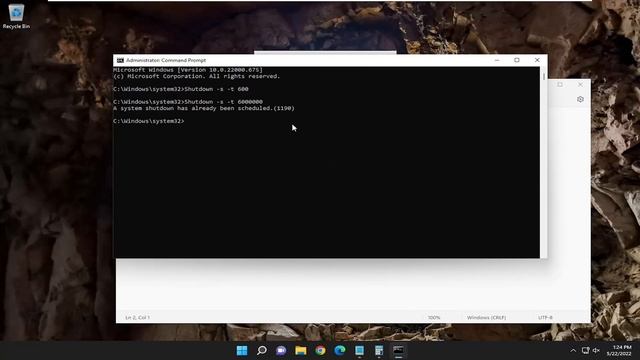
Видео: How to Auto Shutdown Windows 11 | Shutdown Timer Windows 11
How to Auto Shutdown Windows 11 | Shutdown Timer Windows 11. Command (example) used: Shutdown -s -t 2000 By default, Windows is configured to put your computer to sleep after a few minutes of inactivity. But if you prefer to shut down your computer every day or when idle for a long time, you can use the Task Scheduler to schedule an automatic system shut down instead. Here we show you how to schedule shut down in Windows 11 and 10 computers. Issues addressed in this tutorial: shutdown timer windows 11 windows 11 shutdown command timer how to shutdown windows 11 how to set a shutdown timer in windows 10 how to remove shutdown timer windows 10 is there a shutdown timer for windows 10 shutdown timer windows 11 box keeps popping up randomly shutdown timer windows 11 cmd cancel windows shutdown timer command windows command prompt shutdown timer This tutorial will apply for computers, laptops, desktops, and tablets running the Windows 10 and Windows 11 operating systems (Home, Professional, Enterprise, Education) from all supported hardware manufactures, like Dell, HP, Acer, Asus, Toshiba, Lenovo, Alienware, Razer, MSI, Huawei , Microsoft Surface, and Samsung.,

2023-11-15 в 11:09:02

2023-11-15 в 15:32:13

2026-04-20 в 15:04:41

2023-11-15 в 15:11:28





2023-11-15 в 14:48:47

2023-11-15 в 15:22:31



2026-04-20 в 14:48:13

2023-11-15 в 13:02:20

2023-11-15 в 14:00:50



2026-04-20 в 14:32:22

2026-04-20 в 14:09:00