Похожее видео
×
Altium Designer - Easy To Start Simulations
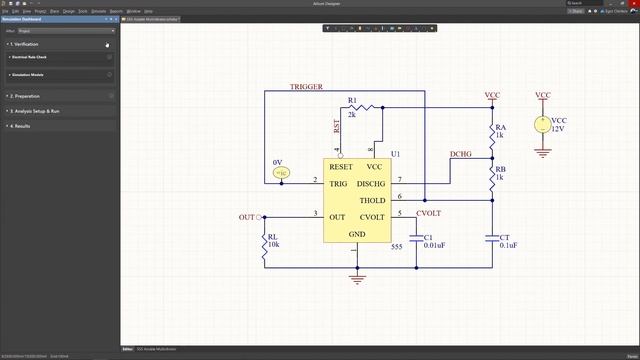
Видео: Altium Designer - Easy To Start Simulations
0:00 Simulation Dashboard Panel Following on from the recent introduction of an advanced new SPICE Simulation engine for Altium Designer the latest round of Simulation updates focuses on user interface. A major component of the Altium Designer Simulation user interface updates is the introduction of the Simulation Dashboard panel. The panel offers a greatly simplified approach to checking configuring running and reviewing simulations. 0:23 Verification One button to invoke a series of automated processes and checks which include the generation of the circuits SPICE Netlist .nsx a number of simulation-related electrical rule checks and simulation model validity checks. The model check will detect components with missing simulation models and models with parsing or pin mapping errors. And also provides the ability to quickly edit and add models. 0:47 Preparation Manage Simulation Sources and Probes that are included in the current schematic. 0:55 Analysis Setup Run Configure and run the required simulation analysis. Once an Operating Point analysis has been run to establish the electrical steady state of the circuit the computed Voltage Power or Current readings at relevant nodes can be shown as labels by selecting the Display on schematic button options in the Simulation Dashboard panel. 1:14 Results Display and manage the results of the most recent simulation runs listed as the available analysis types. The Load Profile option will restore the analysis settings from that run.,


2025-02-24 в 12:32:02

2026-05-20 в 13:57:44


2026-05-20 в 13:54:48

2026-05-20 в 13:40:47


2026-05-20 в 14:04:20

2026-05-20 в 13:43:02
![How To Remove The Evaluation Copy Watermark From Windows 10 For Insiders | 2019 [Hindi]](https://pic.rtbcdn.ru/video/2025-04-18/b0/33/b03395f015ec5fd002cd63baa89de8be.jpg)
2025-02-24 в 12:20:42
2026-05-20 в 14:01:12