Похожее видео
×
How to manage Openshift user credentials using the HTPasswd-PART1

Видео: How to manage Openshift user credentials using the HTPasswd-PART1
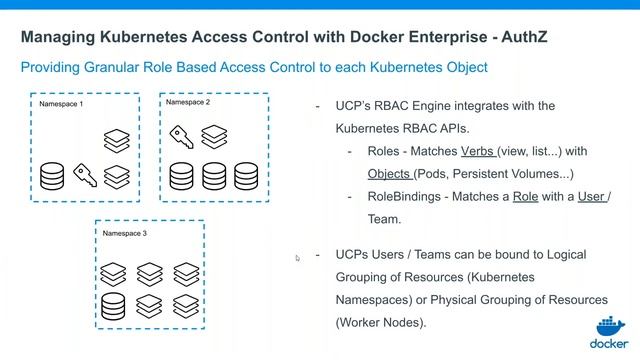
How to manage Openshift user credentials using the HTPasswd 1-Use the htpasswd command to create the HTPasswd authentication file . 2- Log in to the cluster as the kubeadmin user or your admin user if already exists 3- Create a secret to use the HTPasswd identity provider 4- Export the existing OAuth resource to a file named to-be-edit-oauth.yaml in the tmpauth-provider directory. 5- Edit the tmpauth-providerto-be-edit-oauth.yaml and modify the below 6- Apply the custom resource 7- Assign the admin user the cluster-admin role 8- Test users privileges 9- How to remove user,
![Istio: Weaving The Service Mesh [I] - Shriram Rajagopalan, IBM & Louis Ryan, Google](https://pic.rtbcdn.ru/video/54/cd/54cdba9334546753dcb7c25f1710c029.jpg)
2023-12-04 в 03:47:41

2026-04-19 в 15:42:28

2026-04-19 в 15:14:12






2023-12-04 в 03:24:35