
Похожее видео
×
7 - Create ASP.NET Core Web API and React.js Component using VS Code dotnet Tutorial
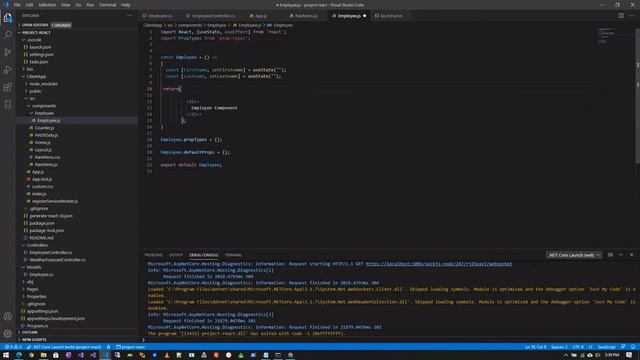
Видео: 7 - Create ASP.NET Core Web API and React.js Component using VS Code dotnet Tutorial
This tutorial continues with Video 4. VS Code .Net Core With React at It shows how to: 1. create Web API with .Net Core 2. test your Web API using the browser 3. create React component 4. add your new React Component to the route and menu. 5. call Web API from React component. On Server Side 1. Create 2 Employee Web API methods Method 1 - Get?id1 Method 2 - GetGetAllEmployees 2. Create 2 files EmployeeController.js Employee.js On Client Side 1. Create React Employees Component a. Using Function Component format instead of the Class Component format. b. Use npx generate-react-cli component Employee to create new component so we need to start from scratch 2. Fetch data from Web API. Use Hooks Hooks are a new addition in React 16.8. They let you use state and other React features without writing a class. a. State Hook add states to our component with useState b. Effect Hook adds the ability to perform side effects from a function component with useEffect useEffect Similar componentDidMount componentDidUpdate and componentWillUnmount in React classes Continue your React learning with video 6 - Create React.js App With Bootstrap Using Reactstrap Component in VS Code at ,

2023-12-04 в 05:16:17



2023-12-04 в 05:24:44


2023-12-04 в 05:22:05

2026-04-21 в 13:30:25
2023-12-04 в 05:08:38

2026-04-21 в 13:24:34

2023-12-04 в 05:15:17



2026-04-21 в 13:30:05