
Похожее видео
×
How to generate speech from text with SpeechGen - TTS Manual
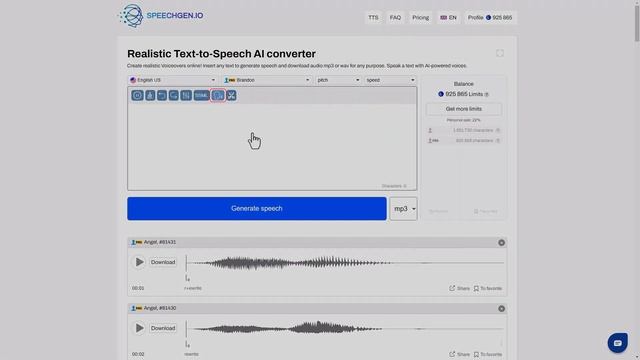
Видео: How to generate speech from text with SpeechGen - TTS Manual
How to generate speech from text with SpeechGen.io. Detailed text-to-speech converter instructions. Greetings to all content creators. I will now tell you how to synthesize realistic speech from text. Please type the text instead or paste the ready-made Press the big blue button and its done! Listen to the track. It sounds natural. You can use the generated audio for commercial purposes. Examples: YouTube Tik Tok Instagram Facebook Twitch Twitter Podcasts Video Ads Advertising E-book Presentations and others. Now lets talk more about essential features. To change the voice click on the speakers name. You can listen to each voice for free on this menu. Click the play button and listen to the voice. Click the name to select a voice and generate audio from your text. To change the language tap the language name. Choose the language you want. For example Ill choose English with a British accent. Great. Now the list of speakers has been updated. Lets take a look at them. Now here are the speakers of the chosen language. I choose Danny. You can change the pitch of your voice here. Ill do a low voice. And now a high voice. That sounds great. You can change the speed here. Increase the speed by 20. Ill make it faster. And now decrease it. He speaks very slowly. Press reset settings to return the default settings Press this button to increase the pause. The more times you click the longer the pause. If you need an exact break insert a special tag. Specify the length of the pause in milliseconds. One thousand milliseconds is one second. Its as simple as that. Okay. Now you can change a stress its easy! If you want to quickly erase all the text click here. If you want to return the text click this arrow or go one step forward. Thats handy! And this button is for expert speech setup. This is the SSML language. See the separate manual on the website and our channel for more details. Generate speech with several different speakers at once. This is easy. You add a voice. In the text select a segment and press wrap. Now there are several voices in the voiceover. You can add many voices in different languages. Listen to how the phrase I love you sounds in different languages. This button is helpful for voicing text with multiple files. For example you want to voice five quotes and distribute them over a timeline in a video editing program. Insert this tag to mark the borders of the segment Download individually or all at once. This is very convenient for editing. You can choose between mp3 wav or ogg to generate the sound. Share the generated file. Click this button and copy the link. Click favorite to save the file to your profile. Your profile saves all your files but they are deleted after 30 days. If you save to favorites they will remain. If you want to delete it click this button. Your profile shows your history and limits deductions. You can see how many limits have gone for each text. This is handy. When you generate a voice the system writes off the limits. You can buy as many as you need for your text. If you voice the exact text again the limits will not be deducted again. We write off limits only for new or changed sentences. This is very economical. If you have any questions write to chat email or telegram. We will help you with any questions about text-to-speech. Ask any questions even the simplest ones. We are happy to help. Create audio content from the text using SpeechGen. Say goodbye to expensive traditional audio creation. Create a professional voiceover in real time for pennies. It is 100 times cheaper than a live speaker. Text to Speech enables brands companies and organizations to deliver enhanced end-user experience while minimizing costs. Create realistic Voiceovers online! Sign up and try it for free! The text is ready. Now Ill add the narrators. I wrap the text for each speaker.,

2023-12-04 в 17:35:41
2023-12-04 в 17:09:11

2026-04-20 в 06:52:28


2026-04-20 в 06:50:12


2024-01-04 в 13:04:08



2023-12-04 в 18:04:21

2023-12-04 в 17:13:33
2023-12-04 в 17:25:58
2023-12-04 в 17:52:09

2026-04-20 в 06:02:50
2023-12-04 в 17:11:00


2023-12-04 в 17:38:59
