Похожее видео
×
LAPS Installation and Configuration
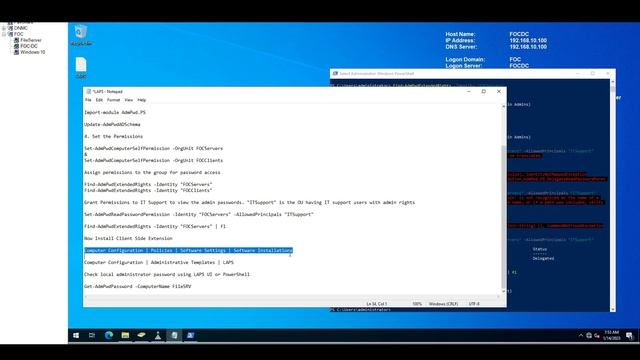
Видео: LAPS Installation and Configuration
1. Download LAPS from Microsoft 2. Install LAPS on AD 3. Extend the AD Schema Import-module AdmPwd.PS Update-AdmPwdADSchema 4. Set the Permissions Set-AdmPwdComputerSelfPermission -OrgUnit FOCServers Set-AdmPwdComputerSelfPermission -OrgUnit FOCClients Assign permissions to the group for password access Find-AdmPwdExtendedRights -Identity FOCServers Find-AdmPwdExtendedRights -Identity FOCClients Grant Permissions to IT Support to view the admin passwords. ITSupport is the Security Group having IT support users with admin rights Set-AdmPwdReadPasswordPermission -Identity FOCServers -AllowedPrincipals ITSupport Find-AdmPwdExtendedRights -Identity FOCServers fl 5. Now Install Client Side Extension Computer Configuration Policies Software Settings Software Installations Computer Configuration Administrative Templates LAPS 6. Testing Check local administrator password using LAPS UI or PowerShell Get-AdmPwdPassword -ComputerName FileSRV,



2026-04-18 в 15:38:02

2024-10-20 в 23:10:51



2024-10-20 в 23:30:09


2024-10-20 в 23:54:06


2026-04-18 в 15:35:08
2024-10-20 в 23:34:10