
Похожее видео
×
how2: LED Striplight Controller and Remote using the MiLight MiBoxer WL5 and FUT092
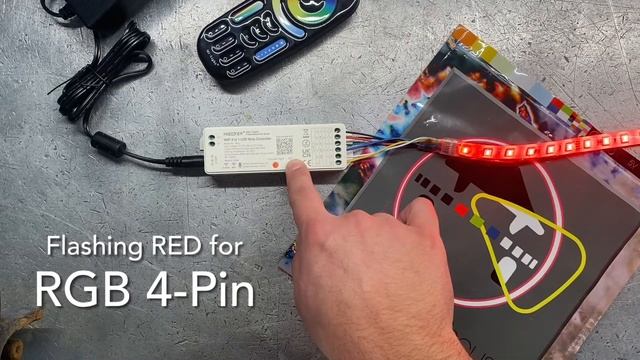
Видео: how2: LED Striplight Controller and Remote using the MiLight MiBoxer WL5 and FUT092
Half of the fun in ledlights is changing the colour to change the mood and create fun or relaxing atmospheres! With MiLight MiBoxer controller and remote you can do just that! Here we show you how to connect a 6-Pin RGBCCT LED strip to the WL5 controller and operate it with the FUT092 remote! The WL5 is an extremely versatile controller that can work with almost any type of LED strip! It has 5 modes for operating 5 different LED types: --Single Colour 2-Pin: this LED strip would only have 2 wires a Positive and a Negative. This is typical for white LEDs although this is not a limitation. --CCT 3-Pin: this LED strip has 3 wires a positive a Warm-white and a Cool-white. These strips can adjust how warm yellowish or how cool bluish the hue is. --RGB 4-Pin: this is the most common colourful LED strip that has 4 wires a Positive a Red a Green and a Blue. --RGBW 5-Pin: this LED strip is the same as RGB but has an extra wire for White. Some come with a Cool-White or a Warm-White but not both. --RGBCCT 6-Pin: This LED strip has it all! 6 wires for RGB and CCT control. Now you can make any colour including Warm and Cool whites and even mix the whites with the colour to change the saturation. Instructions: 1. Strip LED wires about 5mm 2. Insert into the appropriate output terminal of the WL5 and tighten with a small flat-heat screwdriver. Note 2a. Here were are using a 6-Pin RGBCCT strip Black wire Positive terminal Red wire R Green to G Blue to B White to CW Yellow to WW 3. Connect power to the WL5 input jack or input terminal. 4. Set the working mode of the WL5 by pressing the SET button until the indicator light rapidly flashes the appropriate colour. Note 4a. Indicator light RAPID flashes: White Single 2-Pin Yellow CCT 3-Pin Red RGB 4-Pin Green RGBW 5-Pin Blue RGBCCT 6-Pin Note 4b. Indicator light SLOWLY flashes Red not connected to WIFI. Note 4c. Indicator light is solid Green connected to WIFI. Instructions for Linking FUT092 Remote: 5. De-energize the WL5 controller by unplugging it and waiting 10s. 6. Choose which Zone you want to use for this controller. Energize the WL5 by plugging it back in then IMMEDIATELY press the desired Zone ON button 3x. If successful the LED will flash 3x. Instructions for Un-Linking FUT092 Remote: 7. De-energize the WL5 controller by unplugging it and waiting 10s. 8. Energize the WL5 by plugging it back in then IMMEDIATELY press the desired Zone ON button 5x. If successful the LED will flash 10x. apple Lighthouse - the future is bright see for yourself Ask us about LEDs ledstrip ledstriplights lighting diy homeimprovement tutorial how how,
2024-02-04 в 10:13:24


2026-04-21 в 21:21:10

2024-02-04 в 10:13:11
2024-02-04 в 10:13:45








2026-04-21 в 21:30:12


2024-02-04 в 10:14:01

2026-04-21 в 21:19:06